
หลังจากที่ใช้ CodeIgniter ก็เกิดชื่นชอบใน "Template Parser Class" ก็เลยทดลองใช้งาน แล้วก็พบว่า PHP + Array เป็นอะไรที่เข้ากันจริงๆ และช่วงนั้นก็อยากจะเขียนสคริปต์ที่ลดภาระของเซิร์ฟเวอร์ให้เบาลงบ้าง โดยอาศัยหลักการใช้ JavaScript ช่วยแสดงผลแทนคำสั่งของ PHP
ซึ่งตอนนี้ก็มีจะมี AngularJS ที่ตอบโจทย์ข้อนี้อย่างมาก เพียงแต่ว่าผมไม่ได้ต้องการความสามารถทั้งหมดแค่ต้องการแค่ส่วนของ Template เท่านั้น ก็เลยเขียนมันขึ้นมาเองแบบบ้านๆซะเลย ^O^
โครงสร้างโฟลเดอร์และไฟล์
- test_template.php-- js
-- jquery.min.js
-- template_engine.js
-- view
-- test.php
ส่วนของ จาวาสคริปต์ ( template_engine.js )
var zTemplete = {
result : '',
tempContent : '',
viewDir : 'view/',
loadView : function(pFileName) {
var tempView;
$.ajax({
type: "GET",
url: this.viewDir + pFileName,
dataType: "text",
async : false, //synchronous requests
success : function(data){tempView = data;}
});
this.tempContent = tempView;
},
/*** Matching & Replace ***/
matchArray : function(text, xDataArray, mKey) {
var str = text;
var regex = /{(.+?)}/g;
$.each( xDataArray, function( key, value ){
if(mKey){
str = str.replace("{"+ mKey +"}", "").replace("{/"+ mKey +"}", "");
}
if(typeof value == 'object'){
text += zTemplete.matchArray(str, value);
}else{
text = str.replace(regex, function($0, $1){return xDataArray[$1];});
}
});
return text;
},
render : function(pData, pObj) {
if(pData == undefined){
alert('จะต้องส่งข้อมูลอาร์เรย์แบบ JSON เข้ามาในฟังก์ชั่น render() ด้วยครับ');
return;
}
var result = this.tempContent;
$.each( pData, function( key, value ) {
if($.isArray(value)){
var patt = '/{'+key+'}([\\S\\s]*){\\/'+key+'}/g';// key
var patt = eval(patt);
var text_array = result.match(patt);//array
if(text_array != null){
var textList = zTemplete.matchArray(text_array[0], value, key);
textList = textList.replace(text_array[0], '');
result = result.replace(text_array[0], textList);
}
}else{
result = result.replace(eval('/{' + key + '}/g'), value);
}
});
if(pObj != undefined){
$(pObj).html(result);
}else{
return result;
}
}
}
test_template.php (เป็นไฟล์หลักของหน้าเว็บนั้นๆ)
<html>
<head>
<meta charset="UTF-8">
<title>PHP developer test "Template Engine"</title>
<script type='text/javascript' src="../js/jquery.min.js"></script>
<script type='text/javascript' src="js/template_engine.js"></script>
</head>
<body>
<h1>PHP developer test "Template Engine"</h1>
<div id="display_text">No data.</div>
<br/>
<button onclick="Test();">Run</button>
<script type='text/javascript'>
var tpng = zTemplete;
tpng.loadView('test.php');
//ส่วนนี้สามารถรับข้อมูลจาก PHP โดยผ่านฟังก์ชั่น json_encode()
var data = {
blog_title : 'Test template engine.',
blog_heading : 'This is Blog Heading',
blog_entries : [{title : 'Title 1', body : 'This is body text.'}, {title : 'Title 2', body : 'This is body text.'}]
};
function Test(){
tpng.render(data, '#display_text');
}
</script>
</body>
</html>
view/test.php (เป็น Template ที่ต้องการนำมาใช้แสดงผล)
<h1>
{blog_title}
</h1>
<h3>
{blog_heading}
</h3>
{blog_entries}
<hr>
<h5>{title}</h5>
<p>
{body}
</p>
{/blog_entries}
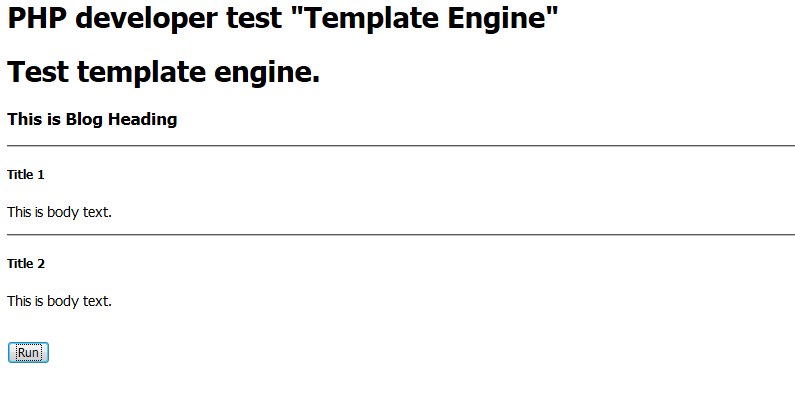
เมื่อเปิดหน้าเว็บไปที่ไฟล์ test_template.php จะแสดงผลดังรูป

เมื่อกดปุ่ม Run ก็จะทำการนำข้อมูลใน data ไปแทรกใน view/test.php ตามชื่อที่กำหนดไว้ และนำกลับมาแสดงผลตามอิเลเมนต์ที่กำหนด
