Bootstrap Flowchart - สร้างโฟลวชาร์ตระบบแบบง่ายๆ

โดย SONGCHAI SAETERN

Bootstrap Determination Flowchart


ตัวอย่างการทำโฟลชาร์ตแบบง่ายๆ ด้วย Bootstrap Frmaework ซึ่งน่าจะนำไปใช้ประโยชน์ต่อการสร้างระบบจัดการโปรเจ็กต์ของเราได้ และสิ่งที่น่าสนใจอีกอย่างคือ

เมื่อนำไปเชื่อมโยงกับระบบ CodeIgniter Generator ที่ผมกำลังสร้างมานั้น อาจจะสามารถสร้างระบบการจัดการโปรเจ็กต์พร้อมสร้างโครงสร้างไฟล์ที่จำเป็นได้เสร็จสรรพ


ที่มา : https://bootsnipp.com/snippets/a36yo


PHP CI MANIA PHP Code Generator 
โปรแกรมช่วยสร้างโค้ด ลดเวลาการเขียนโปรแกรม เขียนโปรแกรมง่ายและสะดวกขึ้น
สนใจสั่งซื้อราคาสุดคุ้ม >> http://fastcoding.phpcodemania.com/

Bootstrap Modal ป๊อบอัพขึ้นมาแล้วภาพพื้นหลังอยู่ด้านบนทับกล่องข้อความ

โดย SONGCHAI SAETERN

Bootstrap modal appearing under background

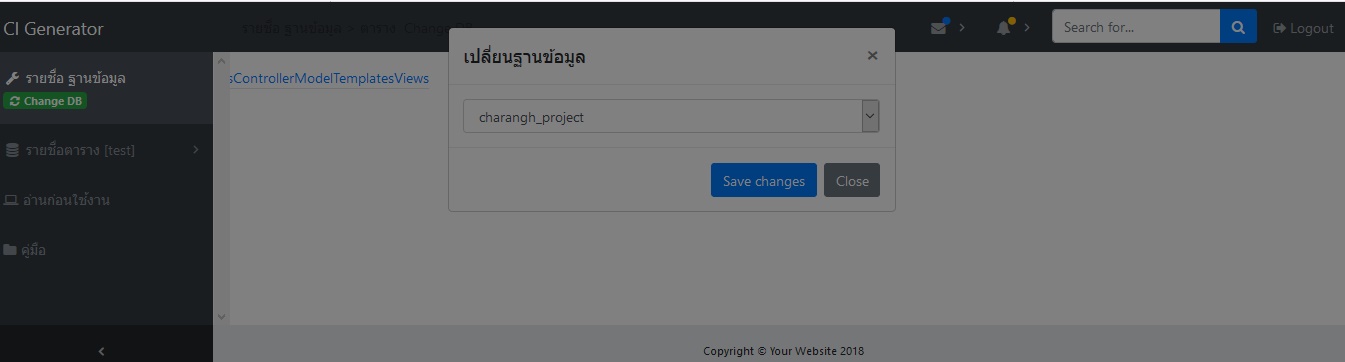
อาการนี้เกิดขึ้นหลังจากที่ลองเปลี่ยนไปใช้ Theme ที่เป็น Bootstrap 4

 1. คลิกป๊อบอัพ Modal แล้วภาพพื้นหลังทับกล่องข้อความ
Bootstrap modal appearing under background


2. มีกระทู้แนะนำให้ย้าย Modal ไปไว้ก่อนปิดแท็ก </body>

Bootstrap modal appearing under background

แก้ปัญหา Autocomplete ที่ชื่อว่า typeahead มักจะเลือกรายการแรกทุกครั้งที่ค้นหา

โดย CyberMAN
เปลี่ยนจากเลือกรายการแรกอัตโนมัติแบบรูปด้านซ้าย => เป็นเลือกเองแบบด้านขวา


ตัว Bootstrap Framework จะมี Autocomplete ที่ชื่อว่า typeahead ปัญหาคือ เวลากดพิมพ์ลงไป พอมันเด้งข้อมูลขึ้นมา มันก็เลือกตัวแรกให้ ทำให้กด Enter มันก็มาทันที
แก้ให้มันไม่ select อัตโนมัติก็ใช้โค้ดประมาณนี้


<script>
    // Initialize typeahead
    $("input").typeahead(...);


    // เริ่มคัดลอกโค้ดจากส่วนนี้เป็นต้นไป =>
    // Get the current typeahead instance
    var typeaheadInstance = $("input").data("typeahead");

    // Save the reference to the original implementation of the render() function
    var origRenderFunc = typeaheadInstance.render;

    // Overwrite the render() function
    typeaheadInstance.render = function() {
        // Execute the original implementation
        var result = origRenderFunc.apply(this, arguments);
        // Remove the 'active' class from the first item
        result.$menu.children().first().removeClass("active")

        return result;
    }

    // <= สิ้นสุดโค้ดที่ต้องใช้

</script>

 ตรงส่วนของ $("input").typeahead(...); คือฟังก์ชั่นที่เราสร้างไว้แล้ว ไม่ต้องนำไปใส่ในโค้ดเรา เอาเฉพาะส่วนที่ถัดมา ตั้งแต่

var typeaheadInstance = $("input").data("typeahead");

 โดยที่ $("input") ให้เปลี่ยนไปตามไอดีของ input ที่ต้องใช้
เพียงเท่านี้ก็จะได้ Autocomplete ที่ไม่เลือกรายการแรกอัตโนมัติ ทำให้เวลากด Enter ไม่ไปเลือกรายการที่เราไม่ได้ต้องการขึ้นมาอีก

ที่มา : https://bibwild.wordpress.com/2013/04/04/overriding-bootstrap-typeahead-to-not-initially-select/

ตัวแสดงจำนวนสินค้าในตะกร้าสินค้า (Shopping cart Counter)

โดย SONGCHAI SAETERN

Cart counter

การใช้งานไอคอนแสดงตัวนับจำนวนสินค้าในตะกร้าสินค้านี้ จะต้องใช้ Bootstrap Framework เข้ามาช่วยในการจัดรูปแบบด้วย


Bootstrap is the most popular HTML, CSS, and JS framework for developing responsive, mobile first projects on the web.


ในส่วนของไอคอนแสดงตัวเลขนั้นจะมีโค้ดอยู่ 2 ส่วนด้วยกัน 


ส่วนที่ 1 CSS

<style>
.cart-box{
position: fixed;
bottom: 40px;
left: 30px;
width: 48px;
height: 48px;
z-index: 2147483000;
cursor: pointer;
background-position: 50%;
}
.btn-circle {
width: 30px;
height: 30px;
text-align: center;
padding: 6px 0;
font-size: 12px;
line-height: 1.428571429;
border-radius: 15px;
}
.btn-circle.btn-lg {
width: 50px;
height: 50px;
padding: 10px 16px;
font-size: 18px;
line-height: 1.33;
border-radius: 25px;
}
.btn-circle.btn-xl {
width: 70px;
height: 70px;
padding: 10px 16px;
font-size: 24px;
line-height: 1.33;
border-radius: 35px;
}
.cart-items-count{
position:relative;
display:flex;
text-align:center;
justify-content: center;
top:-55px;
}
.notification-counter { 
position: absolute;
left: 8px;
background-color: rgba(212, 19, 13, 1);
color: #fff;
border-radius: 3px;
padding: 1px 3px;
font: 8px Verdana;
}
</style>

ส่วนที่ 2 HTML

<div class="cart-box" id="Normal">
<ul class="nav navbar-nav">
<li class="dropdown">
  <button href="#" class="draggable dropdown-toggle btn btn-primary btn-circle btn-xl" data-toggle="dropdown" role="button" aria-expanded="false"> <span class="glyphicon glyphicon-shopping-cart"></span></button>
   <span  class="cart-items-count"><span class=" notification-counter">243</span></span>
</li>
  </ul>
</div>

เมื่อเปิดหน้าเว็บขึ้นมาดูผลลัพธ์จะได้ดังนี้


หากต้องการเปลี่ยนตำแหน่ง ให้กำหนดค่าที่ CSS .cart_box{  ใหม่


ตัวนับจำนวนจะย้ายไปยังตำแหน่งใหม่ที่ต้องการ


โค้ดฉบับเต็มสำหรับทดลอง


<!DOCTYPE html>
<html lang="en">
  <head>
    <meta charset="utf-8">
    <meta http-equiv="X-UA-Compatible" content="IE=edge">
    <meta name="viewport" content="width=device-width, initial-scale=1">
    <!-- The above 3 meta tags *must* come first in the head; any other head content must come *after* these tags -->
    <title>Shopping Cart COUNTER</title>
<link rel="stylesheet" href="https://maxcdn.bootstrapcdn.com/bootstrap/3.3.7/css/bootstrap.min.css" crossorigin="anonymous">
<link href="https://getbootstrap.com/docs/3.3/examples/non-responsive/non-responsive.css" rel="stylesheet">
<style>
.cart-box{
position: fixed;
  bottom: 40px;
  left: 30px;
  width: 48px;
  height: 48px;
  z-index: 2147483000;
  cursor: pointer;
  background-position: 50%;
}
.btn-circle {
  width: 30px;
  height: 30px;
  text-align: center;
  padding: 6px 0;
  font-size: 12px;
  line-height: 1.428571429;
  border-radius: 15px;
}
.btn-circle.btn-lg {
  width: 50px;
  height: 50px;
  padding: 10px 16px;
  font-size: 18px;
  line-height: 1.33;
  border-radius: 25px;
}
.btn-circle.btn-xl {
  width: 70px;
  height: 70px;
  padding: 10px 16px;
  font-size: 24px;
  line-height: 1.33;
  border-radius: 35px;
}
.cart-items-count{
position:relative;
display:flex;
text-align:center;
justify-content: center;
top:-55px;
}
.notification-counter { 
position: absolute;
left: 8px;
background-color: rgba(212, 19, 13, 1);
color: #fff;
border-radius: 3px;
padding: 1px 3px;
font: 8px Verdana;
}
</style>
    <!-- Custom styles for this template -->
 
</head>
<body>
    <!-- Fixed navbar -->
    <nav class="navbar navbar-default navbar-fixed-top">
      <div class="container">
        <div class="navbar-header">
          <!-- The mobile navbar-toggle button can be safely removed since you do not need it in a non-responsive implementation -->
          <a class="navbar-brand" href="#">Shopping Cart</a>
        </div>
        <!-- Note that the .navbar-collapse and .collapse classes have been removed from the #navbar -->
        <div id="navbar">
          <ul class="nav navbar-nav">
            <li class="active"><a href="#">Home</a></li>
            <li><a href="#about">Profile</a></li>
            <li><a href="#contact">Order</a></li>
            <li class="dropdown">
              <a href="#" class="dropdown-toggle" data-toggle="dropdown"
  role="button" aria-haspopup="true" aria-expanded="false">Sale <span class="caret"></span></a>
            </li>
          </ul>
          <form class="navbar-form navbar-left">
            <div class="form-group">
              <input type="text" class="form-control" placeholder="Search">
            </div>
            <button type="submit" class="btn btn-default">Search</button>
          </form>
          <ul class="nav navbar-nav navbar-right">
            <li><a href="#"></a></li>
            <li><a href="#"></a></li>
            <li><a href="#"></a></li>
          </ul>
        </div><!--/.nav-collapse -->
      </div>
    </nav>
 
    <div class="container">
<h1>แสดงตัวนับจำนวนรายการในตะกร้าสินค้า</h1>
<div class="cart-box" id="Normal">
<ul class="nav navbar-nav">
<li class="dropdown">
  <button href="#" class="draggable dropdown-toggle btn btn-primary btn-circle btn-xl" data-toggle="dropdown" role="button" aria-expanded="false"> <span class="glyphicon glyphicon-shopping-cart"></span></button>
   <span  class="cart-items-count"><span class=" notification-counter">243</span></span>
</li>
  </ul>
</div>
    </div> <!-- /container -->
</body>
</html>


ที่มา : https://bootsnipp.com/snippets/ae8qE

PHP CI MANIA PHP Code Generator 
โปรแกรมช่วยสร้างโค้ด ลดเวลาการเขียนโปรแกรม เขียนโปรแกรมง่ายและสะดวกขึ้น
สนใจสั่งซื้อราคาสุดคุ้ม >> http://fastcoding.phpcodemania.com/

Bootstrap Snippets tagged - มีทุกอย่างที่คนใช้ Bootstrap ต้องการ

โดย CyberMAN

Bootstrap Snippets tagged

หากท่านใดที่ใช้ Bootstrap Framework เป็นส่วนออกแบบเว็บไซต์ ที่เว็บไซต์ที่ผู้เขียนนำมาแบ่งปันกันนี้เหมาะมากที่ท่านจะเข้าไปเยี่ยมชม และเลือกสรรมาใช้งานกับเว็บของท่าน

https://bootsnipp.com/tags/dialog


มี Dialog หลากหลายรูปแบบให้เลือกใช้
https://bootsnipp.com/tags/forms


 ตัวอย่างแบบฟอร์ม (Form) มากมาย


แบบฟอร์มสำหรับล็อกอินก็มีให้เลือก

อยากจะทำหน้าสั่งซื้อสินค้าก็มี


มีเยอะจนไม่สามารถแนะนำให้จบในบทความเดียวได้ หากท่านใดสนใจก็ลองเข้าไปเลือกสรรดูกันได้เลยตามลิงค์ที่ให้ไว้ด้านล่างนี้ครับ

ที่มา : https://bootsnipp.com/tags


PHP CI MANIA PHP Code Generator 
โปรแกรมช่วยสร้างโค้ด ลดเวลาการเขียนโปรแกรม เขียนโปรแกรมง่ายและสะดวกขึ้น
สนใจสั่งซื้อราคาสุดคุ้ม >> http://fastcoding.phpcodemania.com/